I just made a demo on how to produce infinite nested iframes: http://infinite-frame.herokuapp.com/
When I tested this, Chrome 21 and IE 9 are both susceptible to fetching and rendering all nested frames which could crash the browsers, i.e. a denial of service attack. (I set a limit on the demo to 100 frames as not to harm your browser or waste resource on my server but it can go on forever.)
The app is deployed on Heroku, a lovely deployment service for development/small projects.
Showing posts with label tech. Show all posts
Showing posts with label tech. Show all posts
9/23/2012
8/02/2012
用代理服务器翻墙体验墙内网络生活
Labels:
proxy server,
tech,
watch Olympics,
看国内视频,
看奥运,
翻墙
背景
很多人都发现很多以前能在国内网站上观看的视频现在都不能看了:显示的解释为你所在地区不能观看该视频。让人很有翻回墙内享受“受限制的幸福”:这样的状况实在讽刺。最近的一个热点是2012年伦敦奥运,转播权管制比较严,在海外不付费一般只能看到照片,很没劲(我觉得视频与照片的差别很少如此明显)。反观国内则有多个网站如cntv.cn大量进行免费网络转播(当然,视频前广告不少),而且其关注的赛事也更符合国人的观看偏好(海外的转播会更关注本国运动员参与的赛事)。
原理
因为所谓的“你所在的地区”是简单地通过检查IP地址区段来实现的,所以只要使用在中国境内的代理服务器(proxy server,一个在你与访问网站之间充当信息中转的角色),就能让访问网站看到一个中国区段内的IP,通过检测。(VPN,Virtual Private Network,也能实现这样的效果但这些服务需要收费——当然了,因此它们也相对更可靠。)
方法
如何找到这些代理服务器呢?我的办法是用过Hide My Ass这个网站(呵呵呵,这个站名够逗的),它提供一个实时更新的可用公共(=免费)代理服务器的列表:http://hidemyass.com/proxy-list
找到位于中国的代理服务器后,只需要把IP和Port的信息填入浏览器的代理设置里,之后浏览器的对外通讯就会经过你填入的代理服务器。在具体的浏览器里如何设置代理可参照(推荐使用Firefox,设置不需要改动系统设定而且很细节化,网上有带图片的说明):
安全
因为设置代理后该浏览器的所有对外通讯(除了设置为例外的目标地址)都会经过代理服务器,有隐私上的隐患(比如登录人人这种只用HTTP协议的网站):代理服务器会不会偷看你发送给访问网站的信息我们无法控制。所以我的建议是:
很多人都发现很多以前能在国内网站上观看的视频现在都不能看了:显示的解释为你所在地区不能观看该视频。让人很有翻回墙内享受“受限制的幸福”:这样的状况实在讽刺。最近的一个热点是2012年伦敦奥运,转播权管制比较严,在海外不付费一般只能看到照片,很没劲(我觉得视频与照片的差别很少如此明显)。反观国内则有多个网站如cntv.cn大量进行免费网络转播(当然,视频前广告不少),而且其关注的赛事也更符合国人的观看偏好(海外的转播会更关注本国运动员参与的赛事)。
原理
因为所谓的“你所在的地区”是简单地通过检查IP地址区段来实现的,所以只要使用在中国境内的代理服务器(proxy server,一个在你与访问网站之间充当信息中转的角色),就能让访问网站看到一个中国区段内的IP,通过检测。(VPN,Virtual Private Network,也能实现这样的效果但这些服务需要收费——当然了,因此它们也相对更可靠。)
方法
如何找到这些代理服务器呢?我的办法是用过Hide My Ass这个网站(呵呵呵,这个站名够逗的),它提供一个实时更新的可用公共(=免费)代理服务器的列表:http://hidemyass.com/proxy-list
 |
| 地区为中国的代理服务器列表截图 |
Web browser instructions
- Mozilla Firefox: Tools > Options > Advanced > Settings > Manual proxy configuration.
- Google Chrome: Options > Under the hood > Network > Change proxy settings > LAN settings > Use a proxy server > Advanced > HTTP.
- Internet Explorer: Tools > Internet options > Connections > LAN settings > Use a proxy server > Advanced > HTTP.
- Opera: Tools > Preferences > Advanced > Network.
(instructions from hidemyass.com)
因为设置代理后该浏览器的所有对外通讯(除了设置为例外的目标地址)都会经过代理服务器,有隐私上的隐患(比如登录人人这种只用HTTP协议的网站):代理服务器会不会偷看你发送给访问网站的信息我们无法控制。所以我的建议是:
- 使用两个浏览器 :Firefox加上Chrome/IE/Opera/others其一,并通过Firefox来使用代理服务器,因为它不需要改动系统设置,这样只有Firefox的对外通讯通过代理服务器,另一个浏览器能如常使用(保持原IP,通讯不经过代理服务器)。
- 不要在使用代理服务器的浏览器里登录你在任何网站上的帐号,以免man-in-the-middle attack以其登录信息、隐私数据的泄漏。只用来浏览网页,看看视频就好。
结语
除了用于体验“墙”内的网络生活,其实使用这些代理服务器还能干很多别的,比如躲过某些网站对同一IP注册账户数的限制,测试某个网站在某个地区具体的浏览效果,当然了除了回中国还可以去体验其他国家的网络生活。

7/10/2012
Donation Buttons Gadget
Labels:
donation gadget,
Google checkout,
Google wallet,
PayPal,
tech
I spent some time today to put two popular payment processing services' -- Google Wallet/Checkout and PayPal -- donation buttons together: this will hopefully capture a wider stream of donation by providing more convenience to my readers.
The gadget validates the donation amount (with friendly responses to errors) before submitting them to respective services. It also tracks button clicks with Google analytics event tracking (with the two payment services differentiated by labels).
The HTML/Javascript source code is hosted at https://gist.github.com/3082002. The gadget looks like the one here in the sidebar. You can copy and paste it into your blog or website (the instruction is given in comments). Before you can accept Google checkout donation from the gadget, you also need to uncheck "My company will only post digitally signed carts." at your Google merchant account's settings>integration setup page.
If you like it, you can always buy me a coffee. Leave me a comment if you have a question or suggestion.
(Check out the error messages by typing in "abc", "0.5", and "999" in the donation gadget before you go. Let me know if you have better ideas for the messages.)
The gadget validates the donation amount (with friendly responses to errors) before submitting them to respective services. It also tracks button clicks with Google analytics event tracking (with the two payment services differentiated by labels).
The HTML/Javascript source code is hosted at https://gist.github.com/3082002. The gadget looks like the one here in the sidebar. You can copy and paste it into your blog or website (the instruction is given in comments). Before you can accept Google checkout donation from the gadget, you also need to uncheck "My company will only post digitally signed carts." at your Google merchant account's settings>integration setup page.
 |
| The donation gadget should look like this. |
(Check out the error messages by typing in "abc", "0.5", and "999" in the donation gadget before you go. Let me know if you have better ideas for the messages.)
5/02/2012
Text Encoding Conversion
I recently learnt about text encoding and was motivated to write a simple program to convert the MP3 tags in batches (most of my Chinese songs' tags were not encoded in UTF-8, the standard across many platforms nowadays). I will try to give a list of the essentials about text encoding and conversion and then talk a bit about the program I wrote.
What are Encoding, Decoding and Conversion?
1. the characters, i.e. symbols, need to be stored in a (binary) physical representation on the computer. The mapping from the symbols to the physical representation is called encoding and the inverse mapping is called decoding. For example, when you read a text file from your hard drive to display on the screen, the program decodes the file content to know what to draw on the screen, and when you save the text file, the program encodes the content into the file. As you might imagine, there are many encoding schemes or codec out there. This creates a problem when a program reads a file with a codec different from the one used to save it.
2. Conversion is a mapping from one physical representation to another such that the decoded text of the output are the same as the decoded text of the input. Conversion is tedious since we need to construct the mapping between the desired encoding pair that might follow very different structures and thus it is hard to automate. (If you are lucky, people have written it before you.) Then Unicode comes to rescue us. Unicode solidified the identity of symbols, which are the abstract beings that we human really care, into code points for each linguistic symbol in every major languages in the world. So now, we can simplify the conversion between any encoding pair by first decoding the binary to Unicode -- this mapping is written for most encoding normally used -- and then encoding them into the desired encoding. Python provides very good Unicode support and Python 3's string is represented in Unicode (handy in handling file names).
3. It is hard for a program to determine what encoding the file is saved in given only the file content in binary. There are various protocols to communicate this information, e.g. the charset declaration in HTTP response and Windows's BOM prefix to txt files. Another solution is to agree on using an encoding large enough to accommodate most, if not all, linguistic symbols, so every program from now on can assume this encoding: like everything is written down in the same language. The standard now is UTF-8 and so you usually want to convert text encoded in other encoding to UTF-8 for compatibility with latest software.
What does my program do?
What are Encoding, Decoding and Conversion?
1. the characters, i.e. symbols, need to be stored in a (binary) physical representation on the computer. The mapping from the symbols to the physical representation is called encoding and the inverse mapping is called decoding. For example, when you read a text file from your hard drive to display on the screen, the program decodes the file content to know what to draw on the screen, and when you save the text file, the program encodes the content into the file. As you might imagine, there are many encoding schemes or codec out there. This creates a problem when a program reads a file with a codec different from the one used to save it.
2. Conversion is a mapping from one physical representation to another such that the decoded text of the output are the same as the decoded text of the input. Conversion is tedious since we need to construct the mapping between the desired encoding pair that might follow very different structures and thus it is hard to automate. (If you are lucky, people have written it before you.) Then Unicode comes to rescue us. Unicode solidified the identity of symbols, which are the abstract beings that we human really care, into code points for each linguistic symbol in every major languages in the world. So now, we can simplify the conversion between any encoding pair by first decoding the binary to Unicode -- this mapping is written for most encoding normally used -- and then encoding them into the desired encoding. Python provides very good Unicode support and Python 3's string is represented in Unicode (handy in handling file names).
3. It is hard for a program to determine what encoding the file is saved in given only the file content in binary. There are various protocols to communicate this information, e.g. the charset declaration in HTTP response and Windows's BOM prefix to txt files. Another solution is to agree on using an encoding large enough to accommodate most, if not all, linguistic symbols, so every program from now on can assume this encoding: like everything is written down in the same language. The standard now is UTF-8 and so you usually want to convert text encoded in other encoding to UTF-8 for compatibility with latest software.
What does my program do?
As you expect, it converts MP3 tags encoded in <encoding> into UTF-8. You need to supply your guess for <encoding> -- I will talk briefly about auto-detecting encoding later. In default, I set the guess to GBK, the most common encoding present in Chinese songs' MP3 tags. This is the culprit that caused all the mess in displaying song information on mobile devices. For a list of acceptable codecs, look here: http://docs.python.org/library/codecs.html#standard-encodings. One cool feature of my program is that it converts the tags character by character and preserves well-formed UTF-8 characters. This design has two advantages. First, I observed that some tags have mixed characters in UTF-8 and other encodings: the other encoding does not have the needed character so some characters were encoded into UTF-8. This technique solves the problem easily. Second, more importantly, this technique makes it safe to run this program multiple times over the same files because it won't change the previously converted content in proper UTF-8.
Using my program
To use this utility (you will need python and mutagen library), download and save the program here: https://gist.github.com/2578542. And in your command prompt or shell, type:
python mp3_tag.py [<dir>]
where <dir> is the directory of MP3 files (handles the current directory if <dir> is missing). This is an example output (a log file will be created too):


A note for Windows users
I used mutagen to access and save MP3 tags. It reads many different formats of MP3 tags but saves all output tags uniformly in ID3v2.4 format which works fine on mobile devices and various modern MP3 players but it is not supported by Win 7 file explorer and the Windows Media Player. (They only support tag versions up to ID3v2.3.) So after conversion, you will see many "?" in the MP3 tags. To solve this problem, you will need to convert the tags to ID3v2.3 with other tools. I used iTunes to do that (right click on the highlighted song(s) and choose "Convert ID3 Tags..." and then select ID3v2.3):

How to detect the encoding?
This is a nontrivial problem because it takes more than a program to determine whether the decoded text makes sense. The funny symbols you get by using a wrong codec are perfectly normal in a different language. It takes a lot intelligence to determine if you use the correct codec. Some modern browsers provides some capabilities to detect the encoding on a page. One idea would be to see if the decoded text fall into some range of frequent characters of some languages. But this only solve some wrong guesses since a page might contain a wide mix of symbols than your assumption. In the context of MP3 tags, let's suppose that Big5 and GBK both decode this same binary but to very different texts and so the assumption on songs using only frequent characters is not a good one because some songs' names do use rare characters. One solution I thought of is to use search engines to select the codec that gives most result on the web: one problem is that many songs are decoded wrongly in the same way of the one sitting in your computer (so wrongly decoded texts often yield much more result than you expect). The other solution I thought of (and actually used to fix conversion errors) is to use SoundHound, a very cool app that can reverse search songs, to listen to a song and return me the song information. (This method could also help you recover the names of forgotten songs in your computer.) Right now, it is a bit silly and time-consuming to do this to a lot of songs as it must be done by hand (unless you reverse engineer SoundHound). I am hoping that SoundHound will release an API soon so this could be automated. (Besides one can use its API do make a Sing Something!)
Coda
Regarding the source code, I do not provide any warranty but you are free to do whatever with my code. It edits some tags of your MP3 files, specifically only the album, artist, album artist, performer, and genre fields (you can modify the code to edit more or less fields) so you might wanna test it on a few duplicates before running it on your entire music library.
5/01/2012
Campus Safe Ride Lookout App
Labels:
android app,
campus safety,
lab,
lbs,
safe ride lookout,
tech
This is my submission to 2012 UChicago Mobile App Challenge. It is a rather simple idea inspired by the need to wait for University of Chicago safe ride shuttle outside at night (possibly in bad weather) due to the lack of arrival information of the shuttle ahead of time. This app aims to solve exactly the information communication problem.
The Idea
This app will be in constant look out for the safe ride shuttle for you.
The Problem
Safe ride is a great service provided by the University and many friends I know use it regularly to get to places not served by the University shuttle at nighttime or in bad weather. The most important concern -- they put it in the name -- safe ride tries to meet is safety. Arguably, convenience of the rider is another concern. But these commitments have been challenged by the unpredictable wait time. This creates problems: standing in the cold or at very late hours is not very pleasant, much less is it safe. At the same time, safe ride drivers would like the riders to be ready to get on the shuttle when they arrive. It is a very reasonable request that saves everyone's time, but in practice, because the approach of the shuttle is not always well communicated in advance and the wait time is unpredictable, many riders and drivers miss each other. The result is that both the riders and drivers are unhappy.
My app will solve these problem to make using safe ride even safer and more convenient. By providing users with more information about the location of the shuttle and notifying the user when it comes within the vicinity of the user, the user can minimize their time exposing in the cold or to danger and the shuttle can wait less and run more efficiently.
The App
This location-based service (LBS) app notifies its user to walk outside when a safe ride shuttle is approaching the user's location. There will be two components to this app. One component lives on the shuttle driver's smartphone to acquire location data (via GPS or Wifi) and send the update of the shuttle location back via data network or SMS message to a server backend. The other component lives on the user's phone to acquire the user's location (via GPS or Wifi) and show the safe ride shuttle's latest location on a map (only) when it comes within the proximity of the user. So the user can get prepared and head outside before the shuttle arrives.
The limit on the viewing of the shuttle location to the user's vicinity is designed to enhance security by only informing the needed audience. Also, the app will require a UChicago email address to sign in to make the information of location of the shuttle even more secure. There are a lot more this system can do beyond these basic capabilities. For example, the user can make reservation from his or her app with a click since the app knows his or her location (and with this feature, we can only disclose the shuttle location to users that have made a reservation).
This is my very first youtube video in which I proposed this app:
The Idea
This app will be in constant look out for the safe ride shuttle for you.
The Problem
Safe ride is a great service provided by the University and many friends I know use it regularly to get to places not served by the University shuttle at nighttime or in bad weather. The most important concern -- they put it in the name -- safe ride tries to meet is safety. Arguably, convenience of the rider is another concern. But these commitments have been challenged by the unpredictable wait time. This creates problems: standing in the cold or at very late hours is not very pleasant, much less is it safe. At the same time, safe ride drivers would like the riders to be ready to get on the shuttle when they arrive. It is a very reasonable request that saves everyone's time, but in practice, because the approach of the shuttle is not always well communicated in advance and the wait time is unpredictable, many riders and drivers miss each other. The result is that both the riders and drivers are unhappy.
My app will solve these problem to make using safe ride even safer and more convenient. By providing users with more information about the location of the shuttle and notifying the user when it comes within the vicinity of the user, the user can minimize their time exposing in the cold or to danger and the shuttle can wait less and run more efficiently.
The App
This location-based service (LBS) app notifies its user to walk outside when a safe ride shuttle is approaching the user's location. There will be two components to this app. One component lives on the shuttle driver's smartphone to acquire location data (via GPS or Wifi) and send the update of the shuttle location back via data network or SMS message to a server backend. The other component lives on the user's phone to acquire the user's location (via GPS or Wifi) and show the safe ride shuttle's latest location on a map (only) when it comes within the proximity of the user. So the user can get prepared and head outside before the shuttle arrives.
The limit on the viewing of the shuttle location to the user's vicinity is designed to enhance security by only informing the needed audience. Also, the app will require a UChicago email address to sign in to make the information of location of the shuttle even more secure. There are a lot more this system can do beyond these basic capabilities. For example, the user can make reservation from his or her app with a click since the app knows his or her location (and with this feature, we can only disclose the shuttle location to users that have made a reservation).
This is my very first youtube video in which I proposed this app:
If you like the idea, like the video, share it with your friends and vote for Safe Ride Lookout at the 2012 UChicago Mobile App Challenge! I will update the progress here before it becomes significant enough to move to its dedicated space.
Update
5/10/2012
Vote for this app at: http://techincubator.uchicago.edu/page/vote-your-favorite-app so safe ride may survive and improve. My hope is that this app along with an automated reservation-dispatch system, which I suggested above, might save the cost needed to keep this service alive.
4/09/2012
One Cause of Slowdown in Android Phones
Labels:
android phone,
custom rom,
moto milestone,
slowdown,
tech
I think many Android phone users are misled into flashing their ROM's frequently and do so as a routine to improve their gradually slowed down phones. Custom ROM's have their indisputable utility but without understanding the cause of system slowdown, changing the ROM only obscures the diagnosis by introducing new factors into the problem and thus it might not solve the problem at all.
I used a Moto Milestone, one of the early popular Android phone, with Android 2.2 a.k.a. Froyo (the ROM was built for some European carrier because Milestone, the GSM counterpart of Moto Droid, was not sold by any carrier in the US). The system was very responsive when I wiped all the data and first flashed it on. Then noticeable slowdown appeared as time passed. After trying a few things, I discovered one simple (and easy) cause:
I used a Moto Milestone, one of the early popular Android phone, with Android 2.2 a.k.a. Froyo (the ROM was built for some European carrier because Milestone, the GSM counterpart of Moto Droid, was not sold by any carrier in the US). The system was very responsive when I wiped all the data and first flashed it on. Then noticeable slowdown appeared as time passed. After trying a few things, I discovered one simple (and easy) cause:
much of the slowdown is due to the growth of user generated data and that some of them are regularly loaded into memory for access (via content providers).
Thus by regularly (backing up if you want to keep the data and) clearing call log, messages, etc, I restore the speed on my phone with ease (without worrying about what is in a new ROM). With the exponential growth in phones' RAM, this will become less a problem and if the programmer practices more care and loads only a small portion of all data at a time: for example, the user does not usually need to see the call history from last week everytime he or she goes into call log.
2/22/2012
Insyde BIOS Advanced Settings
I like to focus on details, often to a painstaking degree: I feel the constant need to adjust the balance between the details and the whole. So when I got my new laptop, I quickly went its BIOS settings and tried to examine all its available settings and whether they are fine tuned for the best performance (CPU states/voltages, memory latency/clock, etc are crucial to achieving this goal).
So I got a HP Pavilion dv6tqe recently and its BIOS is from Insyde. I have never seen this vendor: back when I got my last laptop, I only saw Award, AMI, and Phoenix BIOS around in the market. Anyhow, that only shows how remote I have been from the field. The BIOS settings very much disappointed me with its about ten options with the only meaningful one being the boot order configuration. I went online and searched for something relevant to enabling advanced settings on Insyde BIOS and there are quite some discussion around this topic, including flashing a modded firmware to BIOS and this wonderfully simple solution of
There is one thing to note though: if you set a BIOS administrator password (which you should and many people forget to do), pressing the A key cannot get you to the advanced mode. You will have to clear your admin password and follow the procedure.
So I got a HP Pavilion dv6tqe recently and its BIOS is from Insyde. I have never seen this vendor: back when I got my last laptop, I only saw Award, AMI, and Phoenix BIOS around in the market. Anyhow, that only shows how remote I have been from the field. The BIOS settings very much disappointed me with its about ten options with the only meaningful one being the boot order configuration. I went online and searched for something relevant to enabling advanced settings on Insyde BIOS and there are quite some discussion around this topic, including flashing a modded firmware to BIOS and this wonderfully simple solution of
pressing the A key (for "Advanced"?) after pressing the F10 key (this gives your the BIOS setting page).
I verified that this works with my BIOS with BIOS version F.13 (update: and F.1B). And here is a screenshot.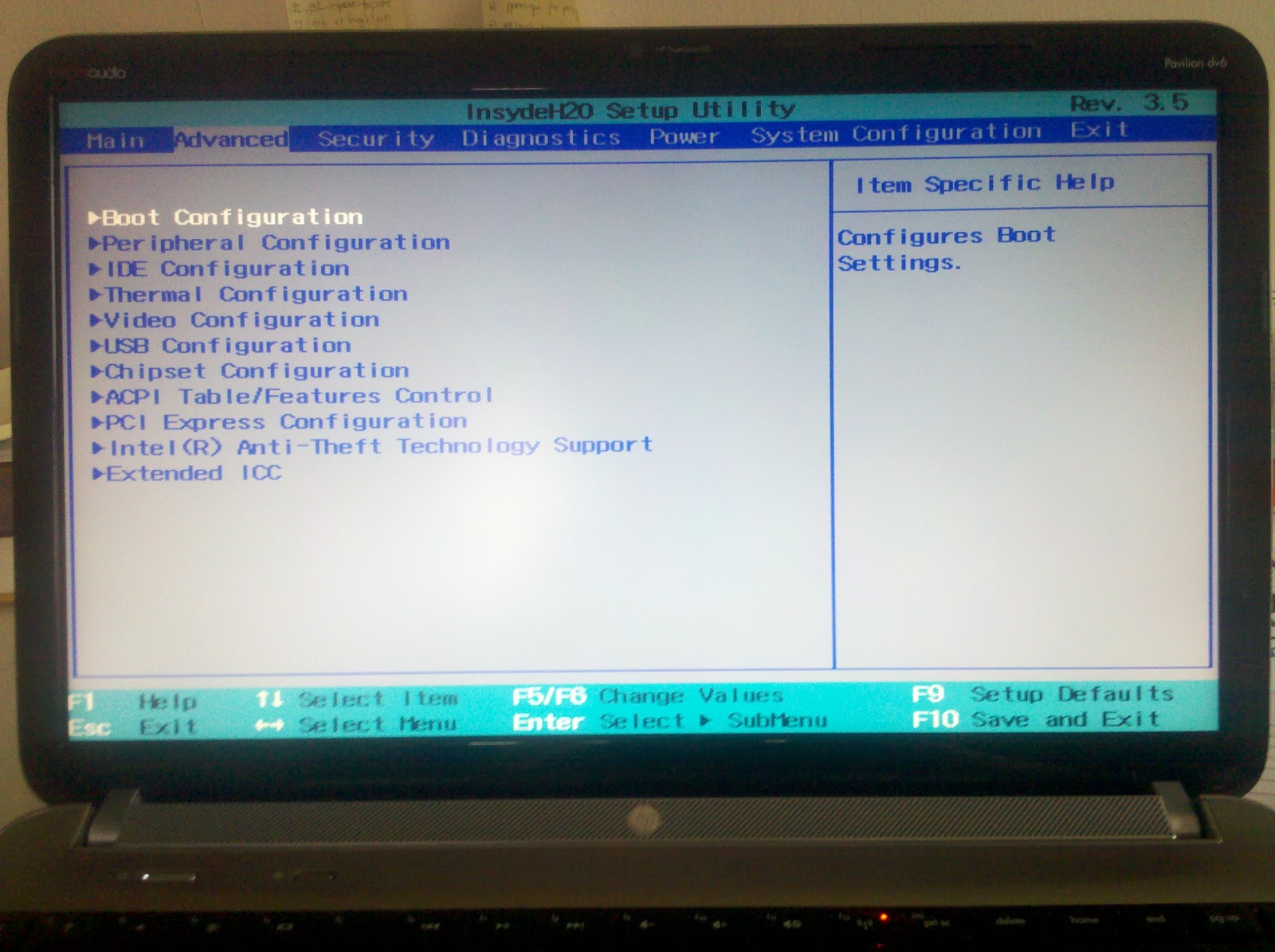 |
| Notice that there are two new tabs named Advanced and Power. |
2/19/2012
Google Multiple Sign-in
Labels:
gmail,
google multiple sign-in,
tech
Google multiple sign-in is a handy feature if you have more than one Google account and you want to switch between them without logging in and out every time. (This log in and out action is still needed for a technical reason which I will point out at the end.) I use it often to switch between my accounts when checking emails (in this way, you can easily have multiple Gmail storage). Note that you need to enable multiple sign-in for your accounts at the account setting page before you can use this feature.
 |
| The switch account button is highlighted on the right. |
 |
| On the list of signed in accounts, the one that you first signed into is marked with (default). |
Although this feature is convenient, it is not supported uniformly well across all Google services. In any case, all sites will recognize your account as the default account which is the one that was first signed in and some of them will let you switch between signed in accounts. The implementation on the popular services such as Gmail, Google docs, and Google Calendar are seamless but not so for some others like Google Wallet (a.k.a. Google checkout). In fact, it can be really confusing sometimes.
If you want to change the default signed in account, there is no click-a-button method to accomplish that at the moment (which should be implemented soon by Google I hope) and so you have to log out (which logs you out of all signed in accounts) and log into the account you wish to make default.
1/16/2012
Polishing My Blog
As I have mentioned in a previous post, I stopped blogging for a while and I blogged when Wordpress did not exist (and Blogger was still Blogspot). The balance between ease to use and detailed customization is hard to achieve. Wordpress chose the radical strategy to provide its source code, thus the (almost) ultimate customizability while supporting an extensive set of add-ons (similar to blogspot's): I think the opensource aspect arguably popularized Wordpress and made its extensions more successful.
My experience with Wordpress comes from the building of a few websites for my friends and organizations: Moneythink China (http://www.moneythink.cn/) and CSSLC (the site I built was closed and this is the new site: http://csslc-focus.com/). Overall, I had a positive experience: there are some issues with add-on compatibility but it is not hard to fix it with some PHP knowledge.
I have played around with the new gadgets and customization Blogger provides over the weekend to polish my blog a bit. I started with a ready-made template by Awesome, Inc. for better browser compatibility (the dynamic template does not run on iPad) and adjusted some Cascading Style Sheet (CSS) code, added my own title background image (I guess I will call it Beyond Limits: it is a wooden fence common in Texas in the foreground) that suits the color theme of the template, drew my own favicon (and that was fun), etc. One complaint I have for Blogger is the long load time which is probably due to the amount of redundancy in CSS code:
My experience with Wordpress comes from the building of a few websites for my friends and organizations: Moneythink China (http://www.moneythink.cn/) and CSSLC (the site I built was closed and this is the new site: http://csslc-focus.com/). Overall, I had a positive experience: there are some issues with add-on compatibility but it is not hard to fix it with some PHP knowledge.
I have played around with the new gadgets and customization Blogger provides over the weekend to polish my blog a bit. I started with a ready-made template by Awesome, Inc. for better browser compatibility (the dynamic template does not run on iPad) and adjusted some Cascading Style Sheet (CSS) code, added my own title background image (I guess I will call it Beyond Limits: it is a wooden fence common in Texas in the foreground) that suits the color theme of the template, drew my own favicon (and that was fun), etc. One complaint I have for Blogger is the long load time which is probably due to the amount of redundancy in CSS code:
 |
| the page is rendered 2.41s after GET request: I think that is quite slow considering that I have very little static assets on the page. |
 |
| A cleanup of redundant CSS code is recommended by Google Chrome Developer Tools. |
I am not surprised by the redundancy since the add-on's come with their CSS and the template will try to override them and then there is user customization but if a user is allowed to go in and have more control over how a page is rendered: in case of Wordpress, you can edit (almost) everything!
The other complaint I have is the customizability for the mobile template: the default page is usually clean and slick but the way how customized items from the web version are used in the mobile version is outside of user control and that might mess things up.
Please let me know if you have any suggestions about the look of my blog.
1/09/2012
Weibo Redirecting Loop Fixed (Finally)
Labels:
curl,
domain redirect,
find,
redirect loop,
tech,
terse,
weibo
Yep, I used Sina Weibo and this is me @ weibo. I have been annoyed by their redirect loop for quite a while. So if you use the handy tool curl to look at weibo.com with


curl -I weibo.com

(the -I switch gives only the returned header). You see that the domain is redirected to www.weibo.com. It used to be that www.weibo.com redirects back to weibo.com, thus the loop. (The way you get out of it was to directly visiting your weibo profile (such as www.weibo.com/falcondai). I think they just fixed this problem in the past few days and www.weibo.com no longer redirects back to weibo.com

1/05/2012
Domain Mapping Verification with Nslookup Command
I have been setting up my domain name(s) and redirection in the past few days. This process is frustrating for me, a starter for the speed of DNS record propagation in the web which might take up to 48 hrs. Basically main name servers around the world will update their records with each other. And my default DNS server which is provided by my ISP might not have a updated record of my zone file and this delays my testing.
I used Windows to do most of my development and I found a good use of its nslookup command to speed up this process by designating the nameserver to the one hosting my zone file using this command
(the "-d" is optional and with it the command returns more details.)
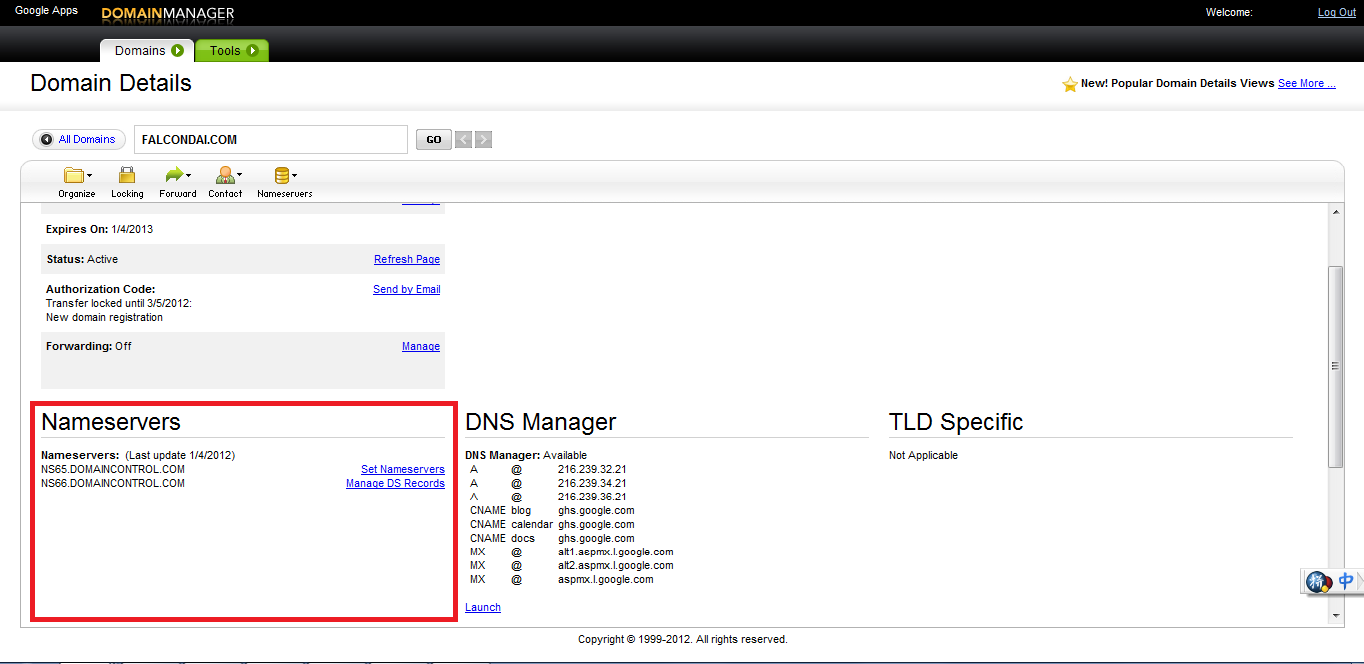
For example, I used GoDaddy to host my domain zone files and my updated zone file lives on ns65.domaincontrol.com (and ns66.domaincontrol.com) as indicated in the screenshot:

For more info on nslookup on Microsoft Support: http://support.microsoft.com/kb/200525
I used Windows to do most of my development and I found a good use of its nslookup command to speed up this process by designating the nameserver to the one hosting my zone file using this command
nslookup -d <your_domain_name> <your_nameserver_url>
Subscribe to:
Posts (Atom)